问题
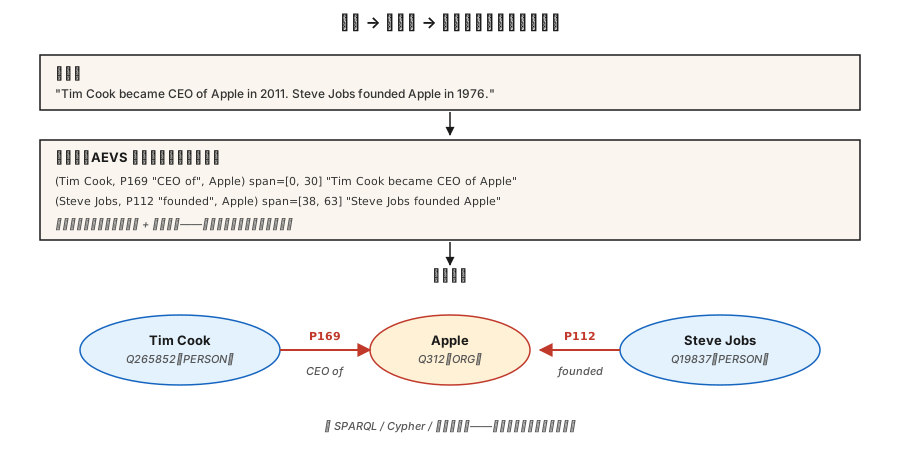
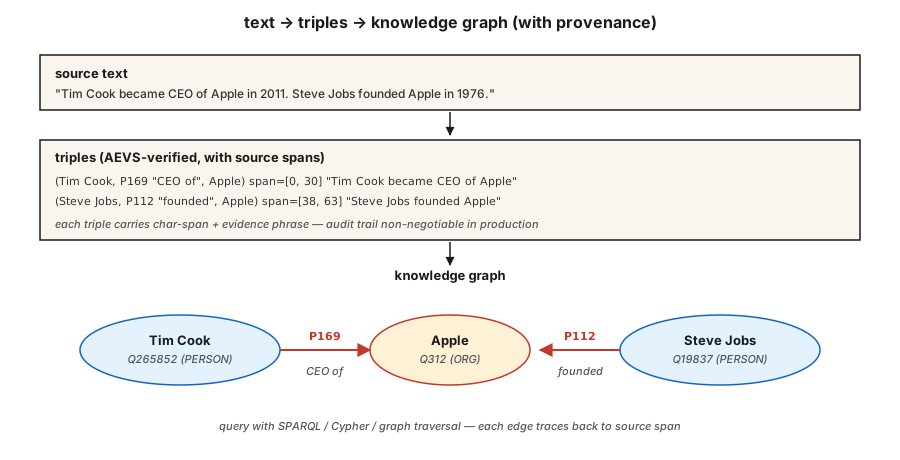
分析师读到:「Tim Cook became CEO of Apple in 2011.」由此得到四个事实:
(Tim Cook, role, CEO)(Tim Cook, employer, Apple)(Tim Cook, start_date, 2011)(Apple, type, Organization)
关系抽取(relation extraction,RE)把自由文本转成结构化三元组 (subject, relation, object)。在语料库上聚合,就得到知识图谱;再聚合再查询,就有了用于 RAG、分析或合规审计的推理底座。
2026 年的问题在于:LLM 抽取关系非常积极,积极过头了。它们会幻觉出源文本并不支持的三元组。没有来源信息,你分不清哪些是真三元组,哪些是看似合理的虚构。2026 年的答案是 AEVS 风格的「锚定—抽取—验证—补充」pipeline。
概念
三元组形式。 (subject_entity, relation_type, object_entity)。关系可以来自封闭本体(Wikidata 属性、FIBO、UMLS),也可以来自开放集合(OpenIE 风格,什么都行)。
三种抽取方法。
- 基于规则 / 模式。 Hearst 模式:「X such as Y」→
(Y, isA, X),再加上手写正则。脆弱但精确,可解释。 - 监督分类器。 给定句子中的两个实体提及,从固定关系集合中预测关系。在 TACRED、ACE、KBP 上训练。2015–2022 年的标准做法。
- 生成式 LLM。 提示模型直接输出三元组。开箱即用,但必须带来源信息,否则会幻觉出看起来像模像样的垃圾。
AEVS(Anchor-Extraction-Verification-Supplement,2026)。 当前用于缓解幻觉的框架:
- 锚定(Anchor)。 以精确位置识别每个实体跨度和关系短语跨度。
- 抽取(Extract)。 生成与锚定跨度关联的三元组。
- 验证(Verify)。 把三元组的每个元素回溯匹配源文本,拒绝任何无依据的内容。
- 补充(Supplement)。 一轮覆盖检查,确保没有锚定跨度被遗漏。
幻觉会显著下降。计算开销更大,但整个流程可审计。
开放 vs. 封闭的权衡。
- 封闭本体。 固定的属性列表(例如 Wikidata 的 11,000+ 个属性)。可预测、可查询、难以凭空捏造。
- 开放信息抽取(Open IE)。 任何动词短语都能成为关系。召回高、精确率低、查询起来混乱。
生产环境的知识图谱通常混用两种方式:先用 Open IE 做发现,再把关系规范化到封闭本体,最后并入主图。
构建它
步骤 1:基于模式的抽取
pythonPATTERNS = [
(r"(?P<s>[A-Z]\w+) (?:is|was) (?:a|an|the) (?P<o>[A-Z]?\w+)", "isA"),
(r"(?P<s>[A-Z]\w+) (?:is|was) born in (?P<o>\w+)", "bornIn"),
(r"(?P<s>[A-Z]\w+) works? (?:at|for) (?P<o>[A-Z]\w+)", "worksAt"),
(r"(?P<s>[A-Z]\w+) founded (?P<o>[A-Z]\w+)", "founded"),
]完整玩具抽取器见 code/main.py。Hearst 模式至今仍用于领域专用 pipeline,因为它们容易调试。
步骤 2:监督关系分类
pythonfrom transformers import AutoTokenizer, AutoModelForSequenceClassification
tok = AutoTokenizer.from_pretrained("Babelscape/rebel-large")
model = AutoModelForSequenceClassification.from_pretrained("Babelscape/rebel-large")
text = "Tim Cook was born in Alabama. He later became CEO of Apple."
encoded = tok(text, return_tensors="pt", truncation=True)
output = model.generate(**encoded, max_length=200)
triples = tok.batch_decode(output, skip_special_tokens=False)REBEL 是一个 seq2seq 关系抽取器:输入文本,输出三元组,且已经是 Wikidata 属性 id。它在远程监督数据上微调,是标准的开源权重基线。
步骤 3:带锚定的 LLM 提示式抽取
pythonprompt = f"""Extract (subject, relation, object) triples from the text.
For each triple, include the exact character span in the source text.
Text: {text}
Output JSON:
[{{"subject": {{"text": "...", "span": [start, end]}},
"relation": "...",
"object": {{"text": "...", "span": [start, end]}}}}, ...]
Only include triples fully supported by the text. No inference beyond what is stated.
"""对返回的每个跨度都回源校验。凡是 text[start:end] != triple_entity 的一律拒绝。这就是 AEVS「验证」步骤的最小形态。
步骤 4:规范化到封闭本体
pythonRELATION_MAP = {
"is the CEO of": "P169", # "chief executive officer"
"was born in": "P19", # "place of birth"
"founded": "P112", # "founded by" (inverted subject/object)
"works at": "P108", # "employer"
}
def canonicalize(relation):
rel_low = relation.lower().strip()
if rel_low in RELATION_MAP:
return RELATION_MAP[rel_low]
return None # drop unmapped open relations or route to manual review规范化往往占整个工程量的 60-80%。要为此预留预算。
步骤 5:构建小图并查询
pythontriples = extract(text)
graph = {}
for s, r, o in triples:
graph.setdefault(s, []).append((r, o))
def neighbors(node, relation=None):
return [(r, o) for r, o in graph.get(node, []) if relation is None or r == relation]
print(neighbors("Tim Cook", relation="P108")) # -> [(P108, Apple)]这是所有「基于知识图谱的 RAG」系统的原子单元。要扩展规模,可以用 RDF 三元组存储(Blazegraph、Virtuoso)、属性图(Neo4j)或向量增强的图存储。
常见陷阱
- 先做共指消解,再做关系抽取。 「He founded Apple」——关系抽取需要知道「he」是谁。先跑共指消解(第 24 课)。
- 实体规范化。 「Apple Inc」和「Apple」必须解析到同一个节点。先做实体链接(第 25 课)。
- 幻觉三元组。 LLM 会输出文本不支持的三元组。强制做跨度验证。
- 关系规范化漂移。 Open IE 的关系写法不一致(「was born in」「came from」「is a native of」)。必须折叠到规范 id,否则图谱无法查询。
- 时间错误。 「Tim Cook is CEO of Apple」——现在为真,2005 年为假。许多关系都有时间边界。使用限定符(Wikidata 中的
P580起始时间、P582结束时间)。 - 领域不匹配。 REBEL 在 Wikipedia 上训练。法律、医疗和科学文本通常需要领域微调过的关系抽取模型。
使用它
2026 年的技术栈:
| 场景 | 选择 |
|---|---|
| 快速生产、通用领域 | REBEL 或 LlamaPred + Wikidata 规范化 |
| 领域专用(生物医学、法律) | SciREX 风格的领域微调 + 自定义本体 |
| LLM 提示、输出需审计 | AEVS pipeline:锚定 → 抽取 → 验证 → 补充 |
| 大批量新闻信息抽取 | 基于模式 + 监督的混合方法 |
| 从零构建知识图谱 | Open IE + 人工规范化 |
| 时序知识图谱 | 带限定符抽取(起始/结束时间、时间点) |
集成模式:NER → 共指消解 → 实体链接 → 关系抽取 → 本体映射 → 图加载。每个阶段都是一个潜在的质量门。
交付它
保存为 outputs/skill-re-designer.md:
markdown---
name: re-designer
description: Design a relation extraction pipeline with provenance and canonicalization.
version: 1.0.0
phase: 5
lesson: 26
tags: [nlp, relation-extraction, knowledge-graph]
---
Given a corpus (domain, language, volume) and downstream use (KG-RAG, analytics, compliance), output:
1. Extractor. Pattern-based / supervised / LLM / AEVS hybrid. Reason tied to precision vs recall target.
2. Ontology. Closed property list (Wikidata / domain) or open IE with canonicalization pass.
3. Provenance. Every triple carries source char-span + doc id. Non-negotiable for audit.
4. Merge strategy. Canonical entity id + relation id + temporal qualifiers; dedup policy.
5. Evaluation. Precision / recall on 200 hand-labelled triples + hallucination-rate on LLM-extracted sample.
Refuse any LLM-based RE pipeline without span verification (source provenance). Refuse open-IE output flowing into a production graph without canonicalization. Flag pipelines with no temporal qualifier on time-bounded relations (employer, spouse, position).练习
- 简单。 用
code/main.py中的模式抽取器跑 5 个新闻句子,手工检查精确率。 - 中等。 在同一批句子上使用 REBEL(或小 LLM),比较三元组。哪个抽取器精确率更高?哪个召回更高?
- 困难。 构建 AEVS pipeline:用 LLM 抽取 + 回源验证跨度。在 50 个 Wikipedia 风格的句子上,测量验证步骤前后的幻觉率。
关键术语
| 术语 | 常见的说法 | 实际含义 |
|---|---|---|
| 三元组 | 主-关系-宾 | (s, r, o) 元组,知识图谱的原子单位。 |
| Open IE | 抽取出一切 | 开放词表的关系短语;召回高、精确率低。 |
| 封闭本体 | 固定 schema | 有界的关系类型集合(Wikidata、UMLS、FIBO)。 |
| 规范化 | 把一切归一化 | 把表面名称 / 关系映射到规范 id。 |
| AEVS | 有依据的抽取 | 锚定-抽取-验证-补充 pipeline(2026)。 |
| 来源(provenance) | 真值来源链接 | 每个三元组都带有指向来源的文档 id + 字符跨度。 |
| 远程监督 | 廉价标签 | 将文本与已有知识图谱对齐以生成训练数据。 |
延伸阅读
- Mintz et al. (2009). Distant supervision for relation extraction without labeled data —— 远程监督论文。
- Huguet Cabot, Navigli (2021). REBEL: Relation Extraction By End-to-end Language generation —— seq2seq 关系抽取主力模型。
- Wadden et al. (2019). Entity, Relation, and Event Extraction with Contextualized Span Representations (DyGIE++) —— 联合信息抽取。
- AEVS — Anchor-Extraction-Verification-Supplement framework —— 2026 年的幻觉缓解设计。
- Wikidata SPARQL tutorial —— 规范图谱查询。
示意图共 1 张